 VoraClip
Everything you copy, one keystroke away.
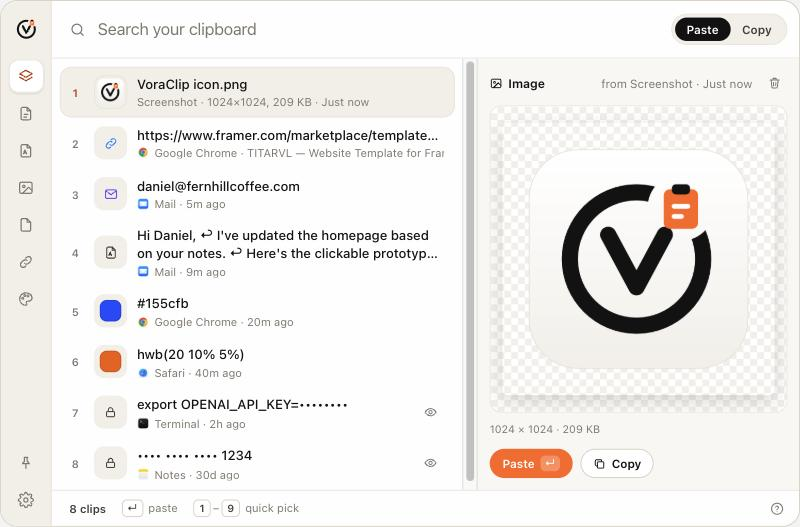
VoraClip keeps your clipboard history on your Mac: text, links, images, files and screenshots. Press ⌘ ⇧ V, pick, and it pastes right where you were typing.
Free for 14 days, no account or card needed.
Made for the way you actually copy.
Everything stays on your Mac. VoraClip has no account, no cloud sync and no tracking.
Pick in a keystroke
The nine most recent clips get numbers. Press 1–9 and it is pasted into the app you were in.
Screenshots, ready to paste
New screenshots can land in VoraClip on their own, and the text inside any image is searchable and copyable.
Secrets stay hidden
Passwords, API keys and card numbers show as dots until you choose to reveal them. Password-manager copies are hidden too.
Links with previews
See each page's title and image, not just a long URL. Colors show as swatches and files keep their names.
Keeps the formatting
Rich text pastes with its styling. Press ⇧↵ when you want plain text instead.
History that stays
Your clips survive restarts. Keep up to 10,000 and search all of them as you type.
Pay once. Keep it.
A lifetime license with free updates. Pick how many Macs you use, and move it to a new Mac any time.
All prices are one-time and in USD; tax is added at checkout where it applies. Payments are handled by Paddle.
Questions
How does the free trial work?
Download VoraClip and use everything for 14 days, with no account or card. After that the history stays, but pasting needs a license.
macOS says it can't verify the developer.
The first time you open VoraClip, right-click the app in Applications and choose Open. Or go to System Settings → Privacy & Security and click “Open Anyway”. After that it opens normally.
Why does VoraClip ask for Accessibility access?
To paste for you. macOS only lets apps press ⌘V on your behalf with this permission. VoraClip never reads your screen or keystrokes.
I got a new Mac. Can I move my license?
Yes. In VoraClip, open Settings → License → Deactivate this Mac. Or sign in on your licenses with your purchase email and remove the old Mac there.
Does my clipboard leave my Mac?
No. History, images and text recognition all stay on your Mac. The only network calls are license checks, update checks and, if you turn them on, link previews.
Can I get a refund?
Yes, within 14 days of purchase. See the refund policy.